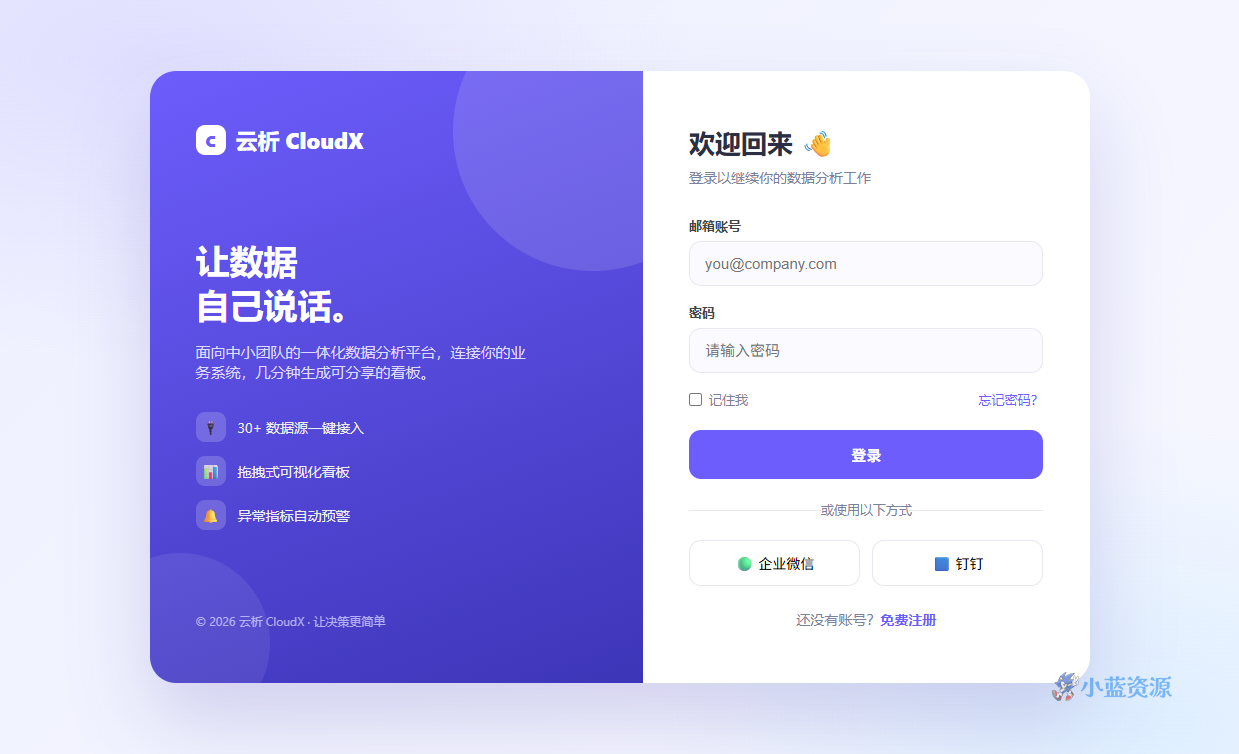
本源码是一款为 SaaS、B2B 产品、管理后台打造的「品牌展示 + 用户登录」双栏单页模板。左侧采用紫罗兰渐变背景,展示产品卖点与功能亮点;右侧则是干净的邮箱、密码登录表单,并附带企业微信、钉钉第三方登录与注册入口。整体设计现代、专业,能有效降低用户登录时的跳出率。
页面左侧的「让数据自己说话」品牌区,用三个小图标说明 30+ 数据源接入、拖拽式可视化看板、异常指标自动预警等核心卖点,帮助新用户快速理解产品价值。右侧表单区使用圆角、聚焦高亮与柔和阴影,交互体验友好。移动端下左侧品牌区自动隐藏,表单区全屏显示,保证小屏幕也能清晰使用。
适合 SaaS 后台、数据中台、企业管理系统的登录入口,也可以作为网页设计课程中表单与响应式布局的练习案例。将 form 的 action 替换为你的后端登录接口,即可直接上线。
使用教程
1. 下载与保存
将下方 HTML 源码全部复制,保存为 index.html 文件(注意文件后缀必须是 .html)。
2. 本地预览
直接双击 index.html 文件,浏览器会自动打开并渲染页面效果。也可以在文件夹内运行 python -m http.server 后访问 localhost:8000 进行预览。
3. 自定义修改
替换文字:直接编辑 HTML 中的标题、段落文本与链接。调整配色:修改 <style> 标签内的 CSS 变量(:root 部分)或具体颜色值。更换图片:将 <img> 的 src 属性换成你自己的图片地址,或将背景渐变替换为 background-image。
4. 上线部署
将 index.html 上传到任意支持静态网页托管的服务(GitHub Pages、Vercel、Netlify、阿里云 OSS、腾讯云 COS 等)即可获得独立访问网址。
HTML 源码
复制下方完整代码,保存为 .html 文件即可在浏览器中预览使用。
<!DOCTYPE html>
<html lang="zh-CN">
<head>
<meta charset="UTF-8">
<meta name="viewport" content="width=device-width, initial-scale=1.0">
<title>云析 CloudX · 登录</title>
<style>
  :root{
    --violet:#6d5dfc; --violet-d:#5442e0; --slate:#1e2235; --ink:#2b2f44;
    --muted:#7b819a; --line:#e6e8f2; --bg1:#eef0ff; --bg2:#f7f8ff;
  }
  *{box-sizing:border-box;margin:0;padding:0}
  body{font-family:"Segoe UI","PingFang SC","Microsoft YaHei",sans-serif;
    color:var(--ink);min-height:100vh;display:flex;align-items:center;justify-content:center;
    background:
      radial-gradient(900px 500px at 12% 8%,#c9c4ff66,transparent 60%),
      radial-gradient(800px 500px at 92% 96%,#b8e0ff66,transparent 60%),
      linear-gradient(135deg,var(--bg1),var(--bg2));
    padding:24px}
  .shell{width:100%;max-width:940px;display:grid;grid-template-columns:1.05fr .95fr;
    background:#fff;border-radius:26px;overflow:hidden;box-shadow:0 40px 80px rgba(54,45,160,.18)}

  /* 左侧品牌区 */
  .brand{background:linear-gradient(160deg,#6d5dfc,#3d35b8);color:#fff;padding:54px 46px;
    display:flex;flex-direction:column;justify-content:space-between;position:relative;overflow:hidden}
  .brand::after{content:"";position:absolute;width:280px;height:280px;border-radius:50%;
    background:rgba(255,255,255,.12);right:-90px;top:-80px}
  .brand::before{content:"";position:absolute;width:180px;height:180px;border-radius:50%;
    background:rgba(255,255,255,.08);left:-60px;bottom:-50px}
  .logo{display:flex;align-items:center;gap:10px;font-weight:800;font-size:22px;z-index:1}
  .logo .dot{width:30px;height:30px;border-radius:9px;background:#fff;color:var(--violet);
    display:flex;align-items:center;justify-content:center;font-size:16px}
  .hero-txt{z-index:1}
  .hero-txt h1{font-size:34px;line-height:1.3;margin-bottom:16px}
  .hero-txt p{color:#dcd9ff;font-size:15px;max-width:330px}
  .feats{z-index:1;display:flex;flex-direction:column;gap:14px;margin-top:30px}
  .feat{display:flex;align-items:center;gap:12px;font-size:14px;color:#eee}
  .feat .ic{width:30px;height:30px;border-radius:9px;background:rgba(255,255,255,.18);
    display:flex;align-items:center;justify-content:center}
  .brand .copy{z-index:1;font-size:12px;color:#cfcbff;opacity:.8}

  /* 右侧表单区 */
  .form-side{padding:54px 46px;display:flex;flex-direction:column;justify-content:center}
  .form-side h2{font-size:26px;margin-bottom:8px}
  .form-side .sub{color:var(--muted);font-size:14px;margin-bottom:30px}
  .field{margin-bottom:18px}
  .field label{display:block;font-size:13px;font-weight:600;margin-bottom:7px;color:#444}
  .field input{width:100%;padding:13px 15px;border:1px solid var(--line);border-radius:12px;
    font-size:15px;background:#fbfbff;transition:.2s;outline:none}
  .field input:focus{border-color:var(--violet);box-shadow:0 0 0 3px #6d5dfc22}
  .row{display:flex;align-items:center;justify-content:space-between;font-size:13px;margin-bottom:22px}
  .row label{display:flex;align-items:center;gap:7px;color:var(--muted);cursor:pointer}
  .row a{color:var(--violet);text-decoration:none}
  .row a:hover{text-decoration:underline}
  .submit{width:100%;background:var(--violet);color:#fff;border:none;padding:14px;border-radius:12px;
    font-size:15px;font-weight:600;cursor:pointer;transition:.2s}
  .submit:hover{background:var(--violet-d)}
  .divider{text-align:center;color:var(--muted);font-size:13px;margin:22px 0;position:relative}
  .divider::before,.divider::after{content:"";position:absolute;top:50%;width:38%;height:1px;background:var(--line)}
  .divider::before{left:0}.divider::after{right:0}
  .oauth{display:grid;grid-template-columns:1fr 1fr;gap:12px}
  .oauth button{flex:1;padding:12px;border:1px solid var(--line);border-radius:12px;background:#fff;
    font-size:14px;cursor:pointer;display:flex;align-items:center;justify-content:center;gap:8px;transition:.2s}
  .oauth button:hover{border-color:var(--violet);background:#fafaff}
  .signup{text-align:center;font-size:14px;color:var(--muted);margin-top:24px}
  .signup a{color:var(--violet);text-decoration:none;font-weight:600}

  @media(max-width:760px){
    .shell{grid-template-columns:1fr}
    .brand{display:none}
    .form-side{padding:44px 28px}
  }
</style>
</head>
<body>

<div class="shell">
  <aside class="brand">
    <div class="logo"><span class="dot">C</span> 云析 CloudX</div>
    <div class="hero-txt">
      <h1>让数据<br>自己说话。</h1>
      <p>面向中小团队的一体化数据分析平台,连接你的业务系统,几分钟生成可分享的看板。</p>
      <div class="feats">
        <div class="feat"><span class="ic">🔌</span> 30+ 数据源一键接入</div>
        <div class="feat"><span class="ic">📊</span> 拖拽式可视化看板</div>
        <div class="feat"><span class="ic">🔔</span> 异常指标自动预警</div>
      </div>
    </div>
    <div class="copy">© 2026 云析 CloudX · 让决策更简单</div>
  </aside>

  <section class="form-side">
    <h2>欢迎回来 👋</h2>
    <p class="sub">登录以继续你的数据分析工作</p>
    <form onsubmit="event.preventDefault();alert('示例登录页:请接入你的后端接口');">
      <div class="field">
        <label for="email">邮箱账号</label>
        <input id="email" type="email" placeholder="you@company.com" autocomplete="username">
      </div>
      <div class="field">
        <label for="pwd">密码</label>
        <input id="pwd" type="password" placeholder="请输入密码" autocomplete="current-password">
      </div>
      <div class="row">
        <label><input type="checkbox"> 记住我</label>
        <a href="#">忘记密码?</a>
      </div>
      <button class="submit" type="submit">登录</button>
    </form>
    <div class="divider">或使用以下方式</div>
    <div class="oauth">
      <button type="button">🟢 企业微信</button>
      <button type="button">🟦 钉钉</button>
    </div>
    <p class="signup">还没有账号?<a href="#">免费注册</a></p>
  </section>
</div>

</body>
</html>
原创文章,作者:小蓝IT,如若转载,请注明出处:https://www.xiaolanzy.com/1927.html
 微信扫一扫
微信扫一扫  支付宝扫一扫