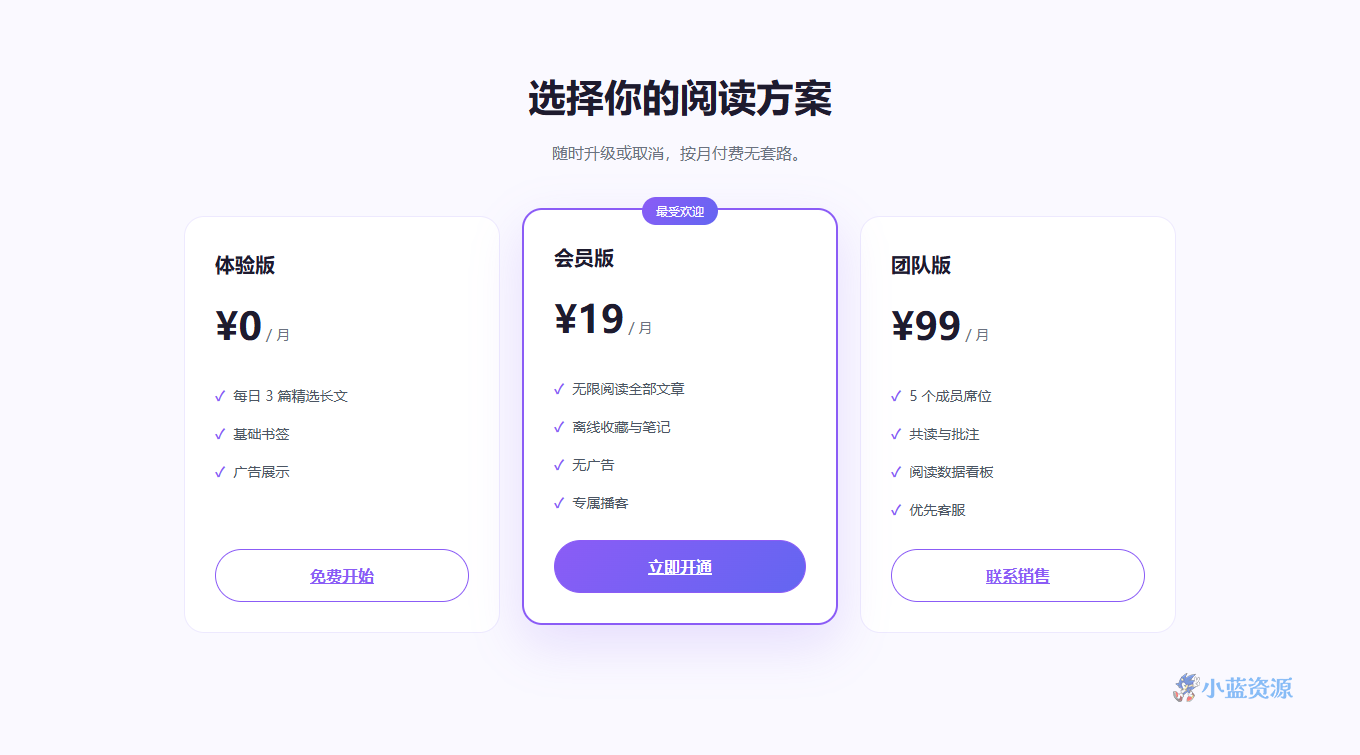
这是一款会员价格表单页源码。三档卡片横向排开(体验版 / 会员版 / 团队版),中间「会员版」做上浮 + 描边 + 渐变高亮,并挂一个「最受欢迎」小标签,视觉上自然引导用户选中间档。适合订阅制、SaaS、社群等需要展示定价的产品。
设计上用紫色渐变作主色,高亮卡通过位移和阴影拉开层级,按钮在 hover 时填充渐变,清单项用对勾标记权益。整体克制、对比清晰,用户一眼能比出差异。
单文件、零依赖、响应式(移动端三栏变单列、高亮卡取消位移)。把价格、权益、按钮链接换成你自己的,一张转化率友好的定价页就位。也是学习「价格锚点 + 高亮引导」的范例。
使用教程
1. 下载与保存
复制代码保存为 pricing.html。
2. 本地预览
双击打开,或运行 python -m http.server 预览。
3. 自定义修改
改价格/权益:编辑对应 .plan 里的 .price 与 ul li。换高亮档:把 .hot 类移到想突出的那张卡。改主色:调 :root 的 --brand / --brand2。改按钮链接:.plan a 的 href。
4. 上线部署
传到静态托管即拥有定价页网址。
HTML 源码
复制下方全部代码,保存为 .html 文件即可在浏览器中直接预览与使用。
<!DOCTYPE html>
<html lang="zh-CN">
<head>
<meta charset="UTF-8">
<meta name="viewport" content="width=device-width, initial-scale=1.0">
<title>静读 ReadHub · 会员价格</title>
<style>
  :root{ --brand:#8b5cf6; --brand2:#6366f1; --ink:#1e1b2e; --muted:#6b7280; --bg:#faf9ff; }
  *{ box-sizing:border-box; margin:0; padding:0; }
  body{ font-family:"PingFang SC","Microsoft YaHei",system-ui,sans-serif; color:var(--ink); background:var(--bg); line-height:1.7; }
  .wrap{ max-width:1040px; margin:0 auto; padding:0 24px; }
  .head{ text-align:center; padding:64px 0 10px; }
  .head h1{ font-size:38px; margin-bottom:10px; }
  .head p{ color:var(--muted); }
  .plans{ display:grid; grid-template-columns:repeat(3,1fr); gap:22px; padding:40px 0 70px; align-items:stretch; }
  .plan{ background:#fff; border:1px solid #ede9fe; border-radius:20px; padding:30px; display:flex; flex-direction:column; }
  .plan.hot{ border:2px solid var(--brand); box-shadow:0 20px 50px rgba(139,92,246,.18); position:relative; transform:translateY(-8px); }
  .plan .flag{ position:absolute; top:-13px; left:50%; transform:translateX(-50%); background:linear-gradient(135deg,var(--brand),var(--brand2)); color:#fff; font-size:12px; padding:4px 14px; border-radius:999px; }
  .plan h3{ font-size:20px; }
  .plan .price{ font-size:38px; font-weight:800; margin:12px 0 2px; }
  .plan .price small{ font-size:14px; color:var(--muted); font-weight:400; }
  .plan ul{ list-style:none; margin:18px 0; flex:1; }
  .plan li{ padding:7px 0; color:#4b5563; font-size:14px; }
  .plan li::before{ content:"✓"; color:var(--brand); font-weight:700; margin-right:8px; }
  .plan a{ display:block; text-align:center; padding:12px; border-radius:999px; border:1px solid var(--brand); color:var(--brand); font-weight:600; transition:.2s; }
  .plan a:hover{ background:linear-gradient(135deg,var(--brand),var(--brand2)); color:#fff; }
  .plan.hot a{ background:linear-gradient(135deg,var(--brand),var(--brand2)); color:#fff; }
  @media (max-width:760px){ .plans{ grid-template-columns:1fr; } .plan.hot{ transform:none; } }
</style>
</head>
<body>
  <div class="wrap">
    <div class="head">
      <h1>选择你的阅读方案</h1>
      <p>随时升级或取消,按月付费无套路。</p>
    </div>
    <div class="plans">
      <div class="plan">
        <h3>体验版</h3>
        <div class="price">¥0<small> / 月</small></div>
        <ul><li>每日 3 篇精选长文</li><li>基础书签</li><li>广告展示</li></ul>
        <a href="#">免费开始</a>
      </div>
      <div class="plan hot">
        <div class="flag">最受欢迎</div>
        <h3>会员版</h3>
        <div class="price">¥19<small> / 月</small></div>
        <ul><li>无限阅读全部文章</li><li>离线收藏与笔记</li><li>无广告</li><li>专属播客</li></ul>
        <a href="#">立即开通</a>
      </div>
      <div class="plan">
        <h3>团队版</h3>
        <div class="price">¥99<small> / 月</small></div>
        <ul><li>5 个成员席位</li><li>共读与批注</li><li>阅读数据看板</li><li>优先客服</li></ul>
        <a href="#">联系销售</a>
      </div>
    </div>
  </div>
</body>
</html>
原创文章,作者:小蓝IT,如若转载,请注明出处:https://www.xiaolanzy.com/1733.html
 微信扫一扫
微信扫一扫  支付宝扫一扫