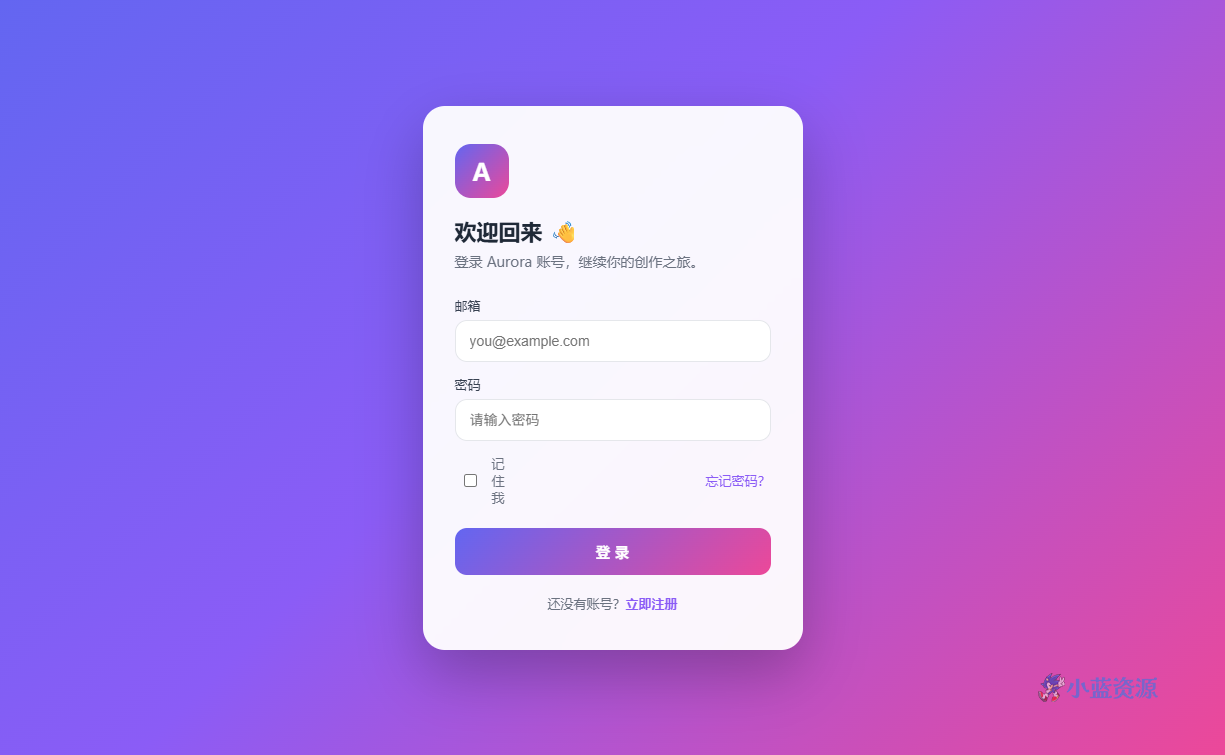
这是一款居中的登录页单页源码。全屏三色渐变背景上,浮着一张半透明毛玻璃卡片,里面是邮箱、密码输入框,以及「记住我 / 忘记密码」和注册入口。非常适合 SaaS 产品、小程序 Web 端、后台系统的登录界面。
设计上用 135deg 的靛蓝到紫到粉渐变铺满视口,卡片用 backdrop-filter: blur 做出毛玻璃质感,输入框聚焦时有紫色高亮描边。整体年轻、现代,第一眼就有质感。
这是纯前端示例(提交时弹提示、不连后端),但表单结构完整:你只需把 <form> 的 action 指向你的登录接口、把 onsubmit 换成真实提交逻辑即可投入使用。单文件、零依赖。
使用教程
1. 下载与保存
复制下方代码保存为 login.html。
2. 本地预览
双击打开即可看到登录界面。
3. 自定义修改
换配色:修改 body 的 linear-gradient 三个色值。改品牌:替换 .logo 里的字母与 <h1> 文案。接后端:把 <form> 的 action 设为接口地址,并把 onsubmit 改为 return true 或你的提交函数;输入框已带 required 校验。
4. 上线部署
作为静态页托管,或嵌入你的项目登录路由。
HTML 源码
复制下方全部代码,保存为 .html 文件即可在浏览器中直接预览与使用。
<!DOCTYPE html>
<html lang="zh-CN">
<head>
<meta charset="UTF-8" />
<meta name="viewport" content="width=device-width, initial-scale=1.0" />
<title>登录页 · Aurora</title>
<style>
  *{box-sizing:border-box;margin:0;padding:0}
  body{font-family:-apple-system,"PingFang SC","Microsoft YaHei",sans-serif;
    min-height:100vh;display:flex;align-items:center;justify-content:center;
    background:linear-gradient(135deg,#6366f1,#8b5cf6 45%,#ec4899);padding:20px}
  .card{width:380px;background:rgba(255,255,255,.95);backdrop-filter:blur(10px);
    border-radius:22px;padding:38px 32px;box-shadow:0 24px 60px rgba(0,0,0,.25)}
  .logo{width:54px;height:54px;border-radius:16px;
    background:linear-gradient(135deg,#6366f1,#ec4899);
    display:flex;align-items:center;justify-content:center;color:#fff;
    font-size:24px;font-weight:800;margin-bottom:18px}
  h1{font-size:22px;color:#1f2937}
  .sub{color:#6b7280;font-size:14px;margin:6px 0 26px}
  label{display:block;font-size:13px;color:#374151;margin:14px 0 6px}
  input{width:100%;padding:12px 14px;border:1px solid #e5e7eb;border-radius:12px;
    font-size:14px;outline:none;transition:.2s}
  input:focus{border-color:#8b5cf6;box-shadow:0 0 0 3px rgba(139,92,246,.15)}
  .row{display:flex;align-items:center;justify-content:space-between;margin:14px 0 22px;font-size:13px}
  .row a{color:#8b5cf6;text-decoration:none}
  .row label{margin:0;display:flex;align-items:center;gap:6px;color:#6b7280}
  .btn{width:100%;padding:13px;border:none;border-radius:12px;color:#fff;
    font-size:15px;font-weight:600;cursor:pointer;
    background:linear-gradient(135deg,#6366f1,#ec4899)}
  .btn:hover{opacity:.92}
  .alt{text-align:center;color:#6b7280;font-size:13px;margin-top:20px}
  .alt a{color:#8b5cf6;text-decoration:none;font-weight:600}
  @media(max-width:420px){.card{width:100%}}
</style>
</head>
<body>
  <form class="card" onsubmit="event.preventDefault();alert('演示:登录成功(前端示例,无后端)')">
    <div class="logo">A</div>
    <h1>欢迎回来 👋</h1>
    <p class="sub">登录 Aurora 账号,继续你的创作之旅。</p>
    <label for="u">邮箱</label>
    <input id="u" type="email" placeholder="you@example.com" required />
    <label for="p">密码</label>
    <input id="p" type="password" placeholder="请输入密码" required />
    <div class="row">
      <label><input type="checkbox" /> 记住我</label>
      <a href="#">忘记密码?</a>
    </div>
    <button class="btn" type="submit">登 录</button>
    <p class="alt">还没有账号?<a href="#">立即注册</a></p>
  </form>
</body>
</html>
原创文章,作者:小蓝IT,如若转载,请注明出处:https://www.xiaolanzy.com/1721.html
 微信扫一扫
微信扫一扫  支付宝扫一扫